Obsidian template vault
Thesis and Report Vault
Write a thesis, dissertation or technical report in numbered chapters, with templates, literature notes and a worked example already set up. Works with the free Section Numbering plugin.
What it is and who it is for
Thesis and Report Vault is an Obsidian vault, not a plugin. It gives students, researchers and engineers a structure that is tedious to build: a thesis manifest, chapter and appendix templates, a single-note report in the style of a standard, and templates for literature notes and supervisor meetings.
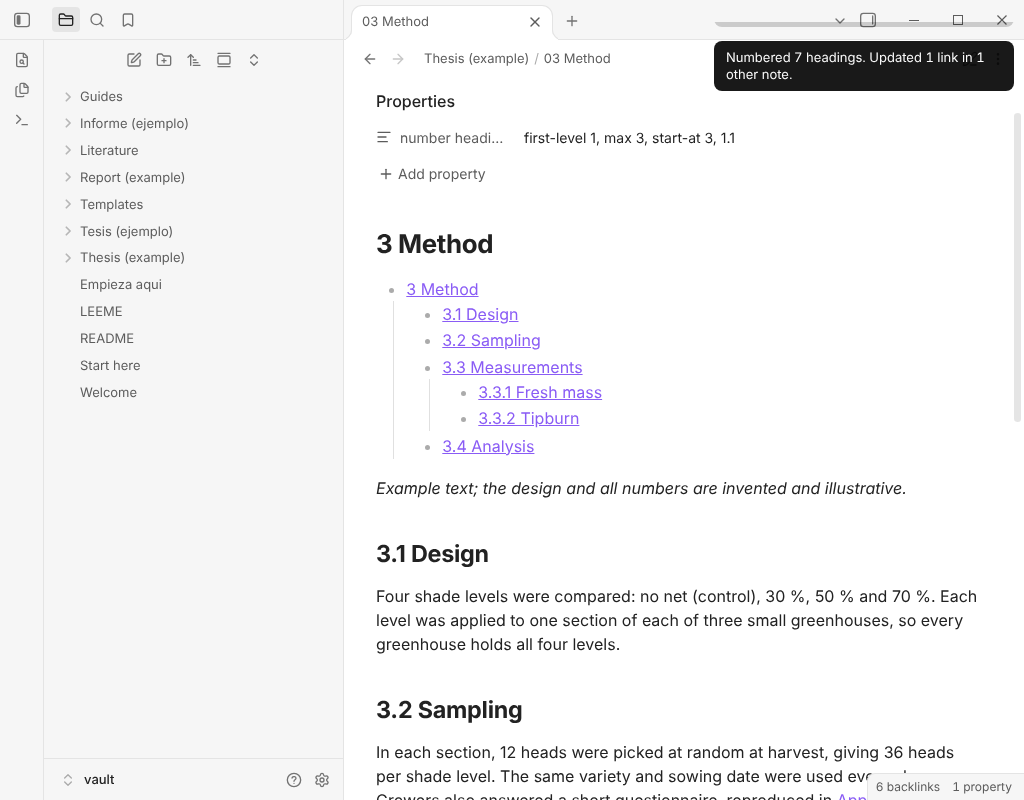
It is made for the free Section Numbering plugin, which numbers headings (1, 1.1, 1.1.1) and keeps a live table of contents. Examples are included in English and in Spanish.
What is inside
- TemplatesThesis chapter, appendix, report, literature note and supervisor meeting, in English and in Spanish.
- A worked thesis exampleA short original thesis with abstract, introduction, literature review, method, results, discussion, conclusion, references and two appendices, numbered with the free plugin. The Spanish version sits beside it. Data and references in the examples are fictional and marked as such.
- A technical report exampleA single-note report with scope, references, terms, requirements and an annex, in English and in Spanish.
- Literature notesTwo example reading notes with the fields to fill: authors, year, source, key claims, quotes with page and how you will use it.
- A numbering guideHow numbering works, what the free plugin does, what Pro adds, and what to do when you reorder chapters.
What you need
- Obsidian, and the free Section Numbering plugin from the community directory. The pack works with the free plugin: chapters are numbered and the table of contents updates without paying for anything.
- Section Numbering Pro is optional. It adds numbering across the whole document, profiles, cross-references, figure and table numbers and export. The guide explains where it helps. Nothing in the pack depends on it.
What you get: one zip of Markdown files and images. No plugin code, no installer, no activation.
Price
12 USD, one-time payment.
One-time payment. No subscription, and no activation: the pack is files, so there is no trial. The price is the same for the English and Spanish content, which come in the same zip.
How to use it
- Download the zip from the receipt email or the payment page.
- Unzip it anywhere you like.
- In Obsidian choose Open folder as vault and pick the unzipped folder.
- Follow Start here: install Section Numbering, open the example thesis, then copy a template and start writing.
Privacy
- It is only Markdown and images. No code, no telemetry, no personal data and no network calls.
- The example texts are original and written for this pack. Authors, data and references in them are fictional.
- This page has no cookies and loads nothing from other sites.
Licence of use
You may use the templates and the structure of the examples in your own theses, reports and papers. You may not resell, share or redistribute the pack itself.
Refunds
Payments are handled by the Bolsterfy shop. Its terms and refund policy are shown before you pay and on its refunds page. Prices are in US dollars; any tax is shown at checkout.
Questions
Do I need Section Numbering Pro?
No. The chapters in the pack are numbered with the free plugin.
Does it work on my phone?
Yes, the vault is plain Markdown and opens in Obsidian mobile.
Is it tied to a university format?
No. It is a general academic structure. Check your institution's rules and adjust the headings.
Will I get updates?
Improvements to the pack will be available from the same payment page. Check it for the current version.
Does it manage citations?
No. It has literature notes and a references page you fill in. It does not generate bibliographies.