Obsidian plugin
Section Numbering Pro
Number documents, not just headings: contracts, theses, standards, manuals and books that span several notes and cite each other.
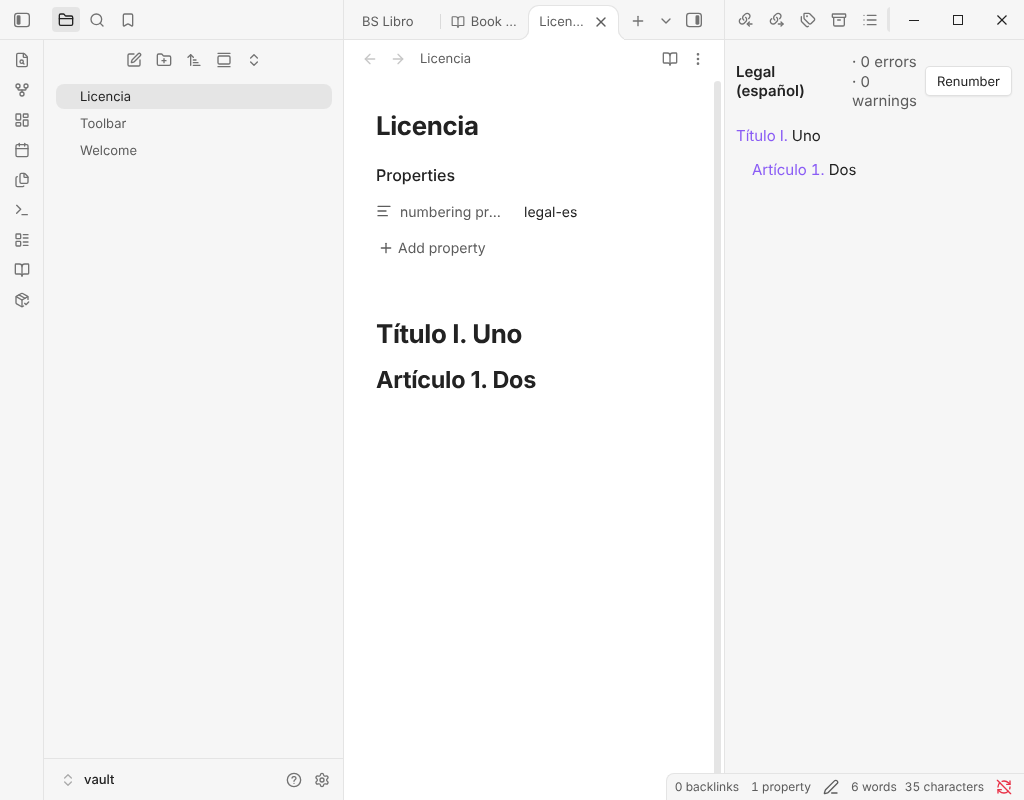
What it does and who it is for
The free Section Numbering plugin numbers the headings of a note. Pro is for people who write documents that live in several notes, cite each other ("see art. 3.2(b)") and leave Obsidian for Word, Pandoc or LaTeX: lawyers, researchers, engineers and authors.
It requires the free Section Numbering plugin (0.10.0 or later) and works with it.
What Pro adds
- Numbering profilesEach heading level gets its own template: Título I. / Artículo 7. / 7.1 / (a). Built in: legal-es, legal-en, contrato, academico, iso, libro and outline. Write your own as JSON.
- Cross-references between notesA reference is an ordinary link whose alias carries the heading's current number, and it follows when the target is renumbered. An alias you wrote yourself is never touched.
- Documents made of many notesA manifest note lists the notes in order, and the whole document is numbered as one text, with a master index and a compiled export.
- Figures, tables and listingsNumbered per chapter, referenced like headings, with lists of figures, tables and listings.
- Structure panelThe numbered outline with how many links point at each section, one-click fixes for level jumps, duplicate or empty headings and stale references, and buttons to move or demote a section. Links update in the same edit.
- ExportNumbered Markdown, an HTML page, Markdown for Pandoc, LaTeX, and copy as rich text to paste into Word or an email.
- RulesChoose a profile per note, per document, per tag or per folder, and ask the plugin to explain which rule decided.
What stays free, for good
- Outline numbers (1., 1.1., 1.2.) for your headings, written into the note or only shown on screen.
- Links to renumbered headings keep working.
- A table of contents that keeps itself up to date.
- Interface in nine languages.
Nothing in the free plugin moves into Pro. Without a key, numbers already in your notes keep working and Flatten to plain numbers always works; writing profile numbers and exporting need a key.
Price
29 USD, one-time payment.
Team licence, up to 5 people: 79 USD.
One-time payment. No subscription. Commercial licence: use it yourself, or buy the team licence for up to 5 people; do not share or resell the file or the key.
Pro is closed-source software under a commercial licence. It is delivered as a zip from the Bolsterfy shop, not through the Obsidian community directory.
How to activate
- After you buy, the Bolsterfy shop emails you a download link for the zip file and your licence key.
- Install the zip following the INSTALL file inside it, then open the plugin's settings in Obsidian and paste the key.
- Press Activate.
Network and privacy
- Everything works offline, and what you write stays in your vault.
- The one network call: when you press Activate, the plugin sends the key, once, to the licence endpoint of the Bolsterfy shop to check it. After that the key is saved on your device and nothing is checked again.
- No telemetry, no analytics, no accounts, no self-update. This page has no cookies and loads nothing from other sites.
Refunds
Payments are handled by the Bolsterfy shop. Its terms and refund policy are shown before you pay and on its refunds page. Prices are in US dollars; any tax is shown at checkout.
Questions
Do I need the free plugin?
Yes. Section Numbering Pro requires the free Section Numbering plugin (0.10.0 or later).
What works without a key?
What is already in your notes keeps working, and Flatten to plain numbers always works. Writing numbers with a profile and exporting need a key.
Will it change my notes behind my back?
No. Numbers are written only when you run a command, and one Ctrl+Z undoes a numbering, links included.
Where do I find my key?
In the receipt email from the Bolsterfy shop.
What do I get for the price?
The plugin for good, for your own use, plus one year of updates. After that it keeps working; you can renew for half the price to keep getting updates.