Free Obsidian plugin
Vim Config
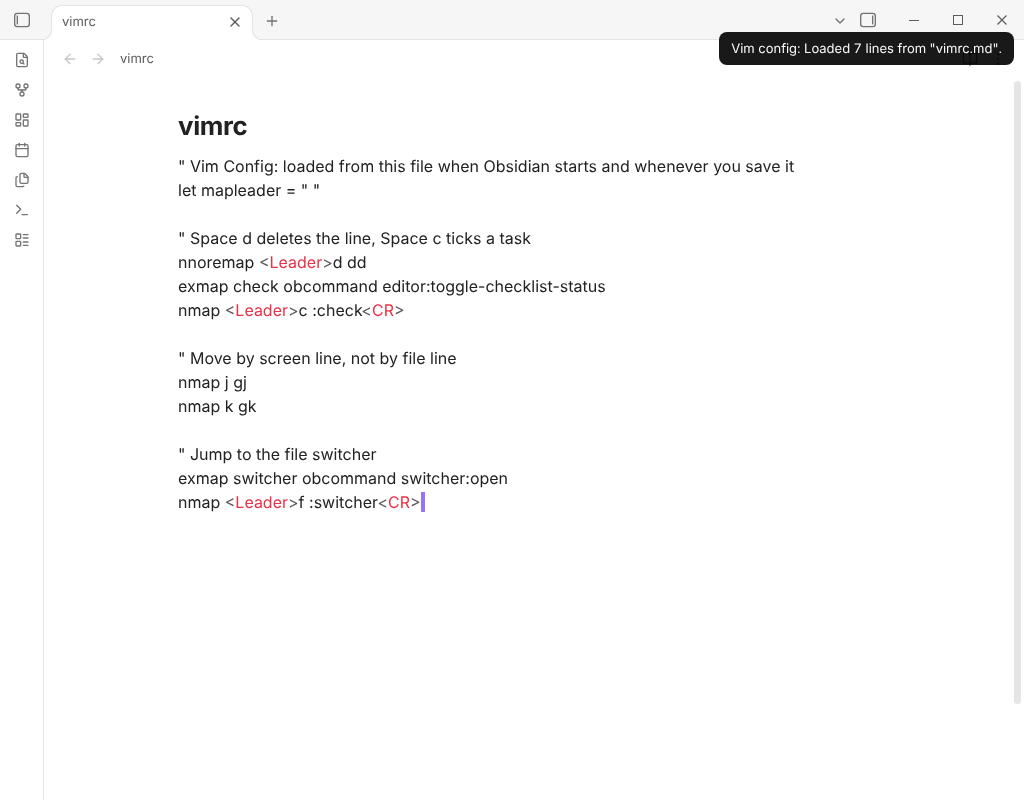
Loads a vimrc-style file from your vault so your key mappings and editor commands are ready when vim mode starts.
Install from the Obsidian directory Open in Obsidian Source code and issues
What it does
Loads a vimrc-style file from your vault so your key mappings and editor commands are ready when vim mode starts.
Obsidian's vim mode has no startup file. With Vim Config you keep your mappings in one file, and they are applied when Obsidian starts and again whenever you save the file. A file written for Vimrc Support works as it is.
Highlights
map,noremapand theirn,i,vandxforms;unmapandmapclearin the same forms.<silent>,<nowait>and similar arguments are accepted and ignored.let mapleader = "…", then<Leader>in later lines.exmap <name> <command>defines your own:namecommand.obcommand <id>runs an Obsidian command by its id (shown in Settings → Hotkeys), so a mapping can do anything the command palette can.set clipboard=unnamed(orunnamedplus) makes yanks and deletes go to the system clipboard, and pastes use it. The clipboard is read when the window gains focus or after a copy, so text copied in another app is there when you come back to Obsidian.- Other
setoptions are passed to the vim engine, which reports the ones it does not know. - A line that starts with
\continues the line before.
Details
- Version
- 0.1.1
- Needs Obsidian
- 0.16.0 or newer
- Platforms
- Desktop and mobile
- Author
- Siulved54
- Price
- Free and open source