Free Obsidian plugin
Update Radar
Checks your installed community add-ons for updates in the background, shows release notes and flags abandoned ones. A successor to the unmaintained Update Tracker.
Install from the Obsidian directory Open in Obsidian Source code and issues
What it does
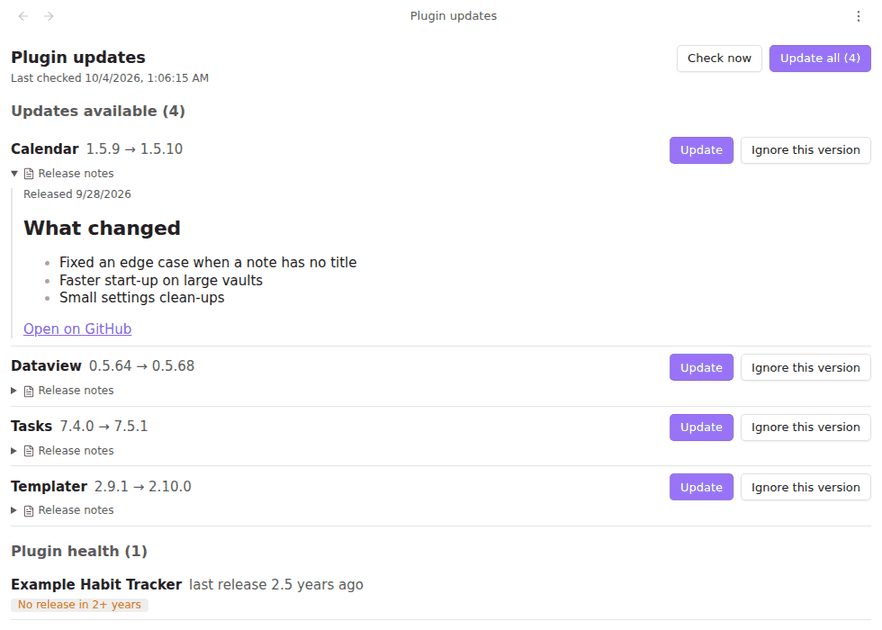
Checks your installed community plugins for updates in the background, shows what changed, and tells you which plugins look abandoned. A successor to Plugin Update Tracker, which has not had a release in over a year.
Formerly "Plugin Update Checker" and, briefly, "Community Update Checker"; renamed because the directory does not allow the word "plugin" in a name and the second name was already taken by an earlier submission.
Obsidian only looks for plugin updates when you open Settings → Community plugins → Check for updates. This plugin does it for you, every few hours, and puts the answer in the status bar.
Highlights
- Updates in the status bar. "3 plugin updates", hidden when there are none. Click it to open the list.
- A list of what changed. Each row shows the installed version, the new one, and, when you open Release notes, the notes from the plugin's GitHub release, rendered as Markdown.
- Update one or all. The same installer Obsidian uses; enabled plugins are reloaded afterwards.
- Ignore this version. Skips exactly that version; the next release shows up again. Stop ignoring brings it back.
- Snooze a plugin. Hide every update of one plugin for 1, 7, 30 or 90 days, from its row, its right-click menu or the Snooze updates of a plugin command. It comes back on its own, or use Unsnooze. Health warnings still show.
- Wait before offering an update. Optional: list a new release under Waiting until Update Radar has seen it for 1, 3, 7, 14 or 30 days. Update now skips the wait; a newer release restarts it.
- Go back to an earlier version. An update broke something? Right-click a plugin in the list, use the history button on an update row, open Install an earlier version at the bottom of the list, or run the command of the same name. You see the plugin's releases (up to 30) with version, date and the start of the notes; the installed one is marked, and a version that needs a newer Obsidian than yours is greyed out. Update Radar then stops offering the version you went back from.
Details
- Version
- 0.5.1
- Needs Obsidian
- 1.7.2 or newer
- Platforms
- Desktop and mobile
- Author
- Siulved54
- Price
- Free and open source